AI Song Generator - Mozart
- 4.2
- Rating
- 1.00M
- Installs
- Free
- Price

 Analysis by App-foxy
I approached AI Song Generator - Mozart AI as a practical music-making tool rather than a replacement for a full digital audio workstation. After spending time with it, my view is fairly clear: it is most appealing when I want to turn a rough idea, lyric concept, or vocal experiment into something listenable without first learning a complicated production workflow. It belongs to the Music & Audio category, comes from NineG, and is free to install, although optional purchases range from $1.99 to $119.99 per item.
The app’s central appeal is immediacy. Instead of opening a blank project and facing tracks, mixers, instruments, and technical settings, I can begin with the musical idea itself. That makes it useful for quick sketches, playful experiments, short background pieces, and voice-based projects. At the same time, the convenience comes with trade-offs: anyone expecting detailed control over every note, instrument, arrangement decision, or final mix may eventually feel constrained.
What using AI Song Generator - Mozart AI feels like
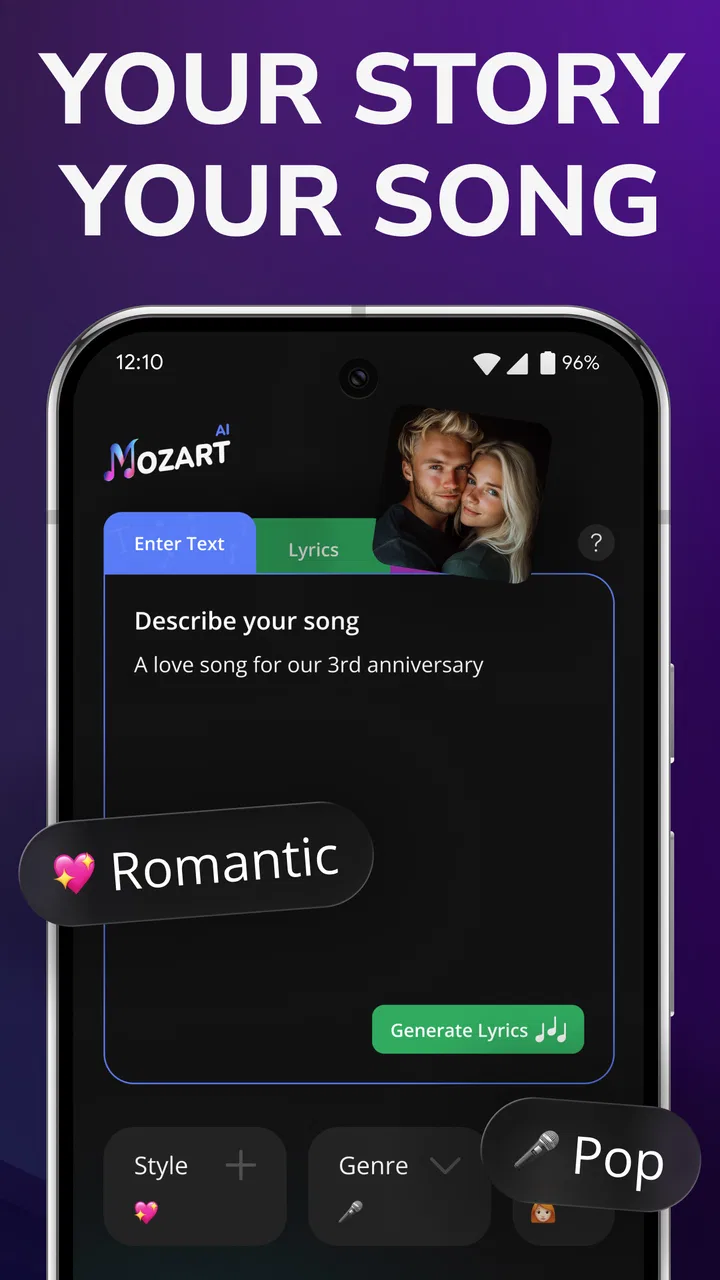
The first thing I noticed is how different the starting point feels compared with a traditional music app. A normal mobile workstation usually asks me to build a song piece by piece. I might choose a drum kit, record a melody, place chords on a timeline, and adjust each layer manually. This app is better suited to the opposite approach: I begin with an intention and let the generator help shape it into a song.
You May Also Like

 Blood Strike: 2.5 Anniversary
Blood Strike’s Loadouts Turn Every Drop Into a Tactical Gamble
A close look at Blood Strike’s custom loadouts: how fast access to signature weapons reshapes its battle royale rhythm, rewards preparation, and narrows the gap between fights.

 Pandora - Music & Podcasts
Pandora’s Music Is Easy to Start, but Harder to Recover
Pandora’s strength is its low-effort path from a seed to a station. Its weak spot is how much confidence it asks you to place in connection, setup, and quiet recovery.

 8 Ball Pool
 Is Built on Rivalries, Rematches, and Routine
A close look at the rivalries, rematches, shared routines, and unanswered safety questions that turn a quick pool match into a persistent mobile community.

 Samsung Music
’s Quiet Strength Is Playing What You Already Own
Its reach comes less from spectacle than from dependable access to a personal library. That simplicity is both the app’s strongest retention engine and its ceiling.

 AccuWeather: Weather Radar
AccuWeather Review: A Quick, Clear Forecast for Everyday Decisions
For everyday plans, the best forecast is the one you can understand quickly. AccuWeather makes rain timing, radar, and local conditions easy to act on, with a few trade-offs.

 Hill Climb Racing
Why Hill Climb Racing Still Turns Crashes Into One More Run
A tiny car, a bumpy hill and one more upgrade: Hill Climb Racing keeps resurfacing because its simple chaos makes every near-miss feel personal.
More From Our News Desk
View All News


That distinction matters for beginners. If I have a theme such as a late-night drive, a birthday message, or a dramatic instrumental mood, I can focus on describing the result I want instead of worrying about music theory. The process feels closer to brainstorming with a musical assistant than operating a miniature studio. I still need to judge whether the result works, but I do not have to solve every production problem before hearing an initial version.
The app also combines several creative directions that are often separated across different tools. Its focus includes AI-generated songs, song creation, vocal removal, and voice-cover work. That makes it more flexible than an app designed only to produce background music. I can approach it as a songwriter, a karaoke hobbyist, or someone testing how a vocal idea might sound over a different musical setting.
The strongest reason to try it is the short distance between an idea and an audible result. That is not the same as saying every output will be ready for release. The value is in reducing the intimidating first step, especially when I have a concept but no polished performance or arrangement.
Where the generator is genuinely useful
I found the generator most useful for early-stage work. Suppose I am preparing a small video and need a mood that feels warm, reflective, or energetic. A conventional stock-music search may produce something close, but not necessarily something shaped around my particular idea. A full production app could offer more control, yet it would take longer to reach a rough draft. This tool sits between those choices: faster than building everything manually, and more personal than selecting a generic track.
Another practical use is songwriting preparation. I can use an initial generation to test whether a lyric concept has enough movement for a chorus or whether the emotional direction feels too flat. Even when I do not keep the generated result, it can reveal what is missing from my idea. That makes the app valuable as a sketchpad, not just as a finished-song machine.
For a casual user, the appeal is even simpler. Someone who has never played an instrument can explore musical ideas without buying equipment or learning a complex interface first. The Everyone content rating also makes it approachable for a broad audience, although younger users should still be guided by a parent or guardian when purchases are possible.
The vocal tools add a separate layer of usefulness. Vocal removal can help when I want to practice over a backing track, examine an arrangement more closely, or prepare a karaoke-style version. It is important to keep expectations realistic: separating vocals from a complete recording is difficult, and the result may contain artifacts or traces of the original voice. Still, having that function in the same app saves the trouble of moving between unrelated utilities.
Three workflows that make more sense than simply pressing generate
My first tip is to treat generation as an iterative conversation with the idea, not as a one-click lottery. I get better creative value when I decide what I am testing before starting. For example, I might be checking the mood, the chorus energy, or the suitability of a vocal style. If I judge every aspect at once, a result with one strong quality can seem disappointing because another part is not what I imagined.
A second useful workflow is to separate the writing stage from the polishing stage. I would first use the app to discover a direction, then listen for the parts worth keeping: perhaps the pacing, the emotional lift, or the contrast between sections. After that, I can rewrite the concept or adjust my expectations instead of endlessly hoping that another random attempt will solve everything. This approach makes the tool more productive and prevents it from becoming a button I press without a clear purpose.
A third insight concerns vocal removal. I would not use that feature only as a final export step. It can also be an analysis tool. Removing the vocal layer may help me hear the arrangement underneath and decide whether the accompaniment is strong enough on its own. Conversely, if the instrumental feels empty once the voice disappears, that tells me the song’s identity depends heavily on the vocal performance. That is useful information for anyone arranging, practicing, or planning a cover.
For voice-cover experiments, I would begin with short, uncomplicated material rather than a demanding performance. A busy arrangement, dense vocal phrasing, or a recording with heavy effects can make the result less convincing. Keeping the source clean and judging the output as an experiment rather than an authentic replacement leads to a much more satisfying experience.
What makes it different from ordinary music apps
Compared with a standard audio editor, this app asks less from me technically. Traditional editors are better when I need precise cuts, detailed volume automation, exact timing, or a carefully controlled mix. They reward patience and manual decisions. Mozart AI is more attractive when the main obstacle is not editing but getting started.
Compared with a karaoke app, its scope is broader. Karaoke software usually begins with an existing song and focuses on singing along. Here, vocal removal is only one part of a wider creative idea that includes generating and shaping songs. That makes it more interesting for experimentation, though a dedicated karaoke product may still be preferable for someone who mainly wants a large, organized singing library and straightforward playback.
Compared with a music streaming service, the difference is obvious: streaming is for discovering and playing finished work, while this app is for making something new. I would not choose it when I simply want reliable listening recommendations. I would choose it when I want to participate in the creation process, even if the result is rough.
Compared with a professional desktop production suite, the app is much less demanding but also less exact. A serious producer may prefer a full workstation for recording multiple takes, editing every performance, controlling instruments, and preparing a release-ready master. Mozart AI makes more sense before that stage, when speed and experimentation matter more than complete ownership of the arrangement.
The weakness I noticed: convenience can reduce control
The main limitation is the same feature that makes the app approachable. AI generation can move quickly, but the user may not have the same level of control available in a manual studio. When a musical detail is almost right but not quite right, I may want to correct only that detail. In a more traditional tool, I can edit the offending note, phrase, or layer directly. In an AI-centered workflow, I may need to try another direction and accept a different set of changes.
That can be frustrating for musicians who already know exactly what they want. If I have a precise melody, a carefully planned chord progression, or a specific arrangement in mind, a manual editor is often the better choice. The app is strongest when I am open to discovery. It is weaker when I need the software to obey a detailed blueprint without deviation.
Vocal processing also deserves a realistic warning. Vocal removal and voice-cover functions can be impressive as creative tools, but audio separation is not magic. Background instruments may leak into the vocal track, and the voice may lose some clarity after processing. I would use these results for practice, demos, social experiments, and idea development before trusting them for a polished professional release.
There is also a financial consideration. The app is free to use at the entry level, but optional in-app purchases can reach $119.99 per item. That does not automatically make it poor value, yet it means I would examine what I can do without paying and decide whether my usage justifies any upgrade before committing. For occasional experimentation, the free starting point may be enough. For frequent generation, costs deserve deliberate attention.
Everyday scenario: turning a rough idea into a shareable draft
Imagine I am planning a short travel video for friends. I have footage of an early train, a crowded station, and a quiet evening walk, but I do not play an instrument and do not want to spend an afternoon learning a complex editor. I can use the app to explore a gentle, forward-moving musical direction, listen for a version that matches the footage, and use the result as a draft soundtrack.
The important part is not accepting the first output blindly. I would compare the musical mood with the pacing of the video, check whether the strongest section arrives at the right moment, and decide whether a vocal element helps or distracts. If a vocal track competes with spoken narration, I might explore the vocal-removal workflow or choose an instrumental direction instead. That kind of decision-making is where the app becomes more useful than a simple novelty generator.
For a student, a similar workflow could help create a presentation atmosphere or test a theme for a creative project. For a hobby singer, vocal removal could provide a practice aid. For a songwriter, generated material could act as a prompt that exposes a stronger chorus idea. Each case uses the app differently, and none requires treating the output as a finished commercial recording.
Who should install it, and who should skip it?
I would recommend it to curious beginners, casual creators, short-form video makers, hobby singers, and writers who want musical feedback on an idea quickly. It is especially suitable for people who feel blocked by the blank screen of a conventional production app. The low entry barrier makes experimentation less intimidating, and the combination of generation and vocal tools gives it more range than a single-purpose novelty app.
I would also recommend it to experienced musicians as a sketching companion, not as their main studio. A trained musician may enjoy using it to break a creative routine, test an unexpected direction, or create a starting point for later manual work. The key is to keep the role clear: it can stimulate ideas, but it may not provide the detailed editing environment needed for final production.
I would skip it if my priority is exact arrangement control, multitrack recording, advanced mixing, or dependable professional mastering. In those situations, a dedicated digital audio workstation is a better investment of time. I would also look elsewhere if I only want to sing along to a large catalog of known songs, because a specialized karaoke service may offer a more focused experience.
Device compatibility is reasonably broad for older hardware because the minimum operating system is Android 7.0. The current version is 9.2.9, so I would still keep the app updated when possible, particularly when working with audio tools that may benefit from fixes and refinements. The app has passed the million-install mark and holds a 4.4 average from around 65 thousand ratings, which suggests that its accessible approach has found a substantial audience, though popularity should not replace checking whether its creative style suits me.
My verdict after weighing the trade-offs
AI Song Generator - Mozart AI succeeds because it makes music creation feel approachable before it makes it technically complete. I like it as a fast idea generator, a vocal experimenter, and a bridge for people who are interested in making songs but are not ready for a full production setup. Its strongest moments come when I give it room to surprise me and use the results as material to evaluate, reshape, or learn from.
The limitations are meaningful. Generated music may not follow a precise creative plan, vocal processing may introduce imperfections, and the optional purchase range means regular users should watch their spending. Those issues do not cancel out the app’s value, but they define the audience clearly. This is not the tool I would choose for meticulous studio control or a guaranteed release-ready master.
For everyone else, the free starting point makes it easy to test the concept without immediately buying equipment or studying a complicated workflow. I would install it when I wanted to turn a lyric, mood, or vocal idea into something audible in minutes. My recommendation is simple: use it as a creative launchpad, not as a substitute for musical judgement or a complete recording studio.
FAQs for AI Song Generator - Mozart
01What is AI Song Generator - Mozart AI?
AI Song Generator - Mozart AI is a cutting-edge application that uses artificial intelligence to help users compose original music pieces. Whether you're an aspiring musician or a seasoned composer, this app provides tools to generate melodies, harmonies, and even lyrics, all tailored to your preferences and style.
02How user-friendly is the interface of Mozart AI?
Mozart AI boasts a highly intuitive interface, designed to cater to both beginners and experienced musicians. The app features easy-to-navigate menus and step-by-step guides that assist users in creating their own compositions effortlessly, making it accessible for users with varying levels of technical expertise.
03What types of music can I create with Mozart AI?
With Mozart AI, you can create a wide variety of music genres, including classical, pop, jazz, and more. The app's AI engine is capable of generating diverse musical compositions, allowing users to explore and experiment with different styles and sounds according to their preferences.
04Is there a cost associated with using Mozart AI?
Mozart AI offers both free and premium versions. The free version provides basic features suitable for casual users, while the premium version unlocks advanced tools and additional content for a subscription fee. Users can choose the plan that best fits their needs and budget.
05How does Mozart AI ensure the originality of the compositions?
The app employs sophisticated algorithms to generate unique musical pieces by analyzing patterns and structures from a vast database. While it draws inspiration from existing works, Mozart AI ensures that each composition is original and personalized, minimizing the risk of plagiarism.
Pros
- User-friendly interface for all skill levels.
- Wide variety of musical styles available.
- Quick song generation with high quality.
- Customizable settings for personalized output.
- Offers seamless integration with DAWs.
Cons
- Limited free version features available.
- Requires internet for full functionality.
- Occasional output lacks human touch.
- Subscription fees can be pricey.
- Some genres less developed.

AI Song Generator - Mozart
Gallery